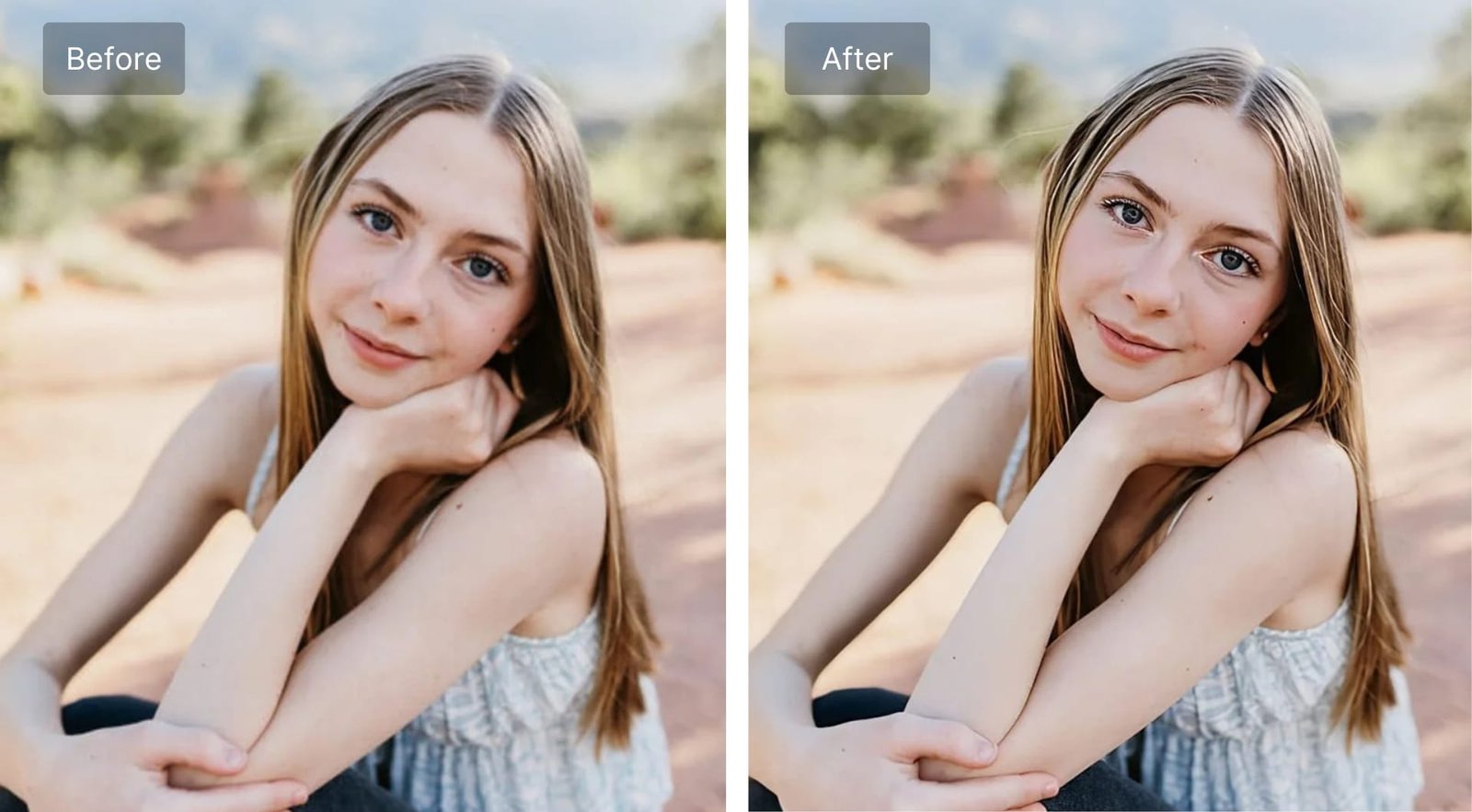
Introduction: Why Your Photos Deserve Better Than “Good Enough”
You’ve captured the perfect moment — a golden sunset, a milestone birthday, a product shot for your brand. But when you open the photo, reality bites. It’s blurry. The lighting is off. The resolution is too low to print or post professionally.
That’s exactly where an AI image enhancer steps in.
Gone are the days when fixing a low-quality image meant hours hunched over Photoshop with a professional-grade skill set. Today, artificial intelligence can analyze, restore, and upscale your photos in seconds — with results that often look indistinguishable from the original high-resolution shot.
Whether you’re a photographer, a content creator, an e-commerce seller, or someone who just wants their old family photos looking their best, this guide will tell you everything you need to know about AI image enhancement — what it is, how it works, which tools to trust, and how to get the most out of them.
What Is an AI Image Enhancer?
An AI image enhancer is a software tool powered by machine learning algorithms — specifically deep learning models like convolutional neural networks (CNNs) — that automatically improves the quality of digital images.
Unlike traditional editing software that simply stretches pixels (making images look blurrier when enlarged), AI enhancers are trained on millions of image pairs. They learn what a high-quality version of a low-quality image should look like, and then intelligently reconstruct it.
Here’s what a modern AI image enhancer can typically do:
- Upscale resolution — enlarge images 2x, 4x, or even 8x without losing sharpness
- Remove noise and grain — clean up photos taken in low light or with older cameras
- Sharpen blurry images — recover detail from out-of-focus or motion-blurred shots
- Enhance color and contrast — automatically balance exposure and vibrancy
- Restore old or damaged photos — recover faded prints and scratched scans
- Remove JPEG compression artifacts — fix the blocky distortion from over-compressed files
The technology has matured rapidly. What once required expensive desktop software and powerful hardware can now run in a browser or a smartphone app in under a minute.
How Does AI Image Enhancement Actually Work?
The Role of Deep Learning
The engine behind every great AI image enhancer is a type of neural network trained through a process called supervised learning. Developers feed the model thousands — sometimes millions — of image pairs: a low-quality version and its high-quality counterpart. Over time, the model learns patterns that allow it to predict missing detail with remarkable accuracy.
Super-Resolution Technology
One of the most impressive capabilities is AI super-resolution. Traditional upscaling averages out pixel values, which creates that characteristic soft, smudged look. Super-resolution models, by contrast, synthesize new pixels based on learned patterns — essentially making an educated guess about what detail should be there, and getting it right most of the time.
Noise Reduction Without Softening
Noise reduction has always been a balancing act. Remove too little, and the grain stays. Remove too much, and the image looks plasticky and fake. AI models handle this far more gracefully by identifying what is grain and what is genuine texture — preserving the fine detail that matters while eliminating the visual static that doesn’t.
Top Use Cases for an AI Image Enhancer
1. E-Commerce Product Photography
Product images directly influence buying decisions. A blurry or poorly lit product photo can cost you sales. AI image enhancement lets sellers upscale and sharpen product shots without reshooting — saving time and money while keeping listings visually competitive.
2. Social Media and Content Creation
Platforms like Instagram, YouTube, and Pinterest are visually driven. High-quality images get more engagement, more shares, and more followers. An AI image enhancer helps creators maintain a polished aesthetic even when working with imperfect source material.
3. Photo Restoration
Old family photographs fade, crack, and lose detail over time. AI-powered restoration tools can breathe new life into archival images — sharpening faces, restoring colors, and removing years of physical damage — all without touching the original print.
4. Real Estate Photography
First impressions in real estate listings are everything. AI enhancers can sharpen exterior shots, correct uneven indoor lighting, and boost the curb appeal of property photos before they go live on listing sites.
5. Medical and Scientific Imaging
Beyond personal and commercial use, AI image enhancement has serious professional applications. In fields like radiology and microscopy, enhancing image clarity can support better analysis and more accurate outcomes.
Best AI Image Enhancer Tools in 2026
There are dozens of options on the market. Here are some of the most trusted:
Topaz Photo AI
One of the most powerful desktop-based options available. Topaz Photo AI combines noise reduction, sharpening, and upscaling into a single intelligent workflow. It analyzes each image individually and applies targeted enhancements rather than blanket filters.
Adobe Firefly / Lightroom AI
Adobe has deeply integrated AI enhancement into its Creative Cloud ecosystem. Lightroom’s AI-powered Denoise tool and Super Resolution feature are particularly impressive for photographers already working within the Adobe workflow.
Remini
A mobile-first AI image enhancer that has become a household name for photo restoration. It’s especially good at enhancing faces in old or low-quality portraits — a favorite for anyone wanting to restore family memories.
Let’s Enhance
A browser-based AI upscaling tool designed for e-commerce and creative professionals. It supports bulk enhancement, making it ideal for businesses handling large volumes of product imagery.
Upscayl
A free, open-source AI image enhancer that runs locally on your device. For privacy-conscious users who don’t want to upload personal photos to the cloud, Upscayl is a reliable and powerful alternative.
Practical Tips to Get the Best Results from an AI Image Enhancer
Getting great output isn’t just about picking the right tool — it’s also about how you use it. Here are practical tips that will make a real difference:
- Start with the best source file you have. AI enhancement improves quality, but it can’t invent detail that was never there. A slightly blurry DSLR shot will enhance far better than a heavily compressed WhatsApp image.
- Use lossless formats when possible. Before enhancing, save your image as a PNG or TIFF rather than a JPEG. This avoids adding extra compression artifacts before the AI even gets to work.
- Choose the right enhancement mode. Most tools offer specific presets — portrait, landscape, product, document. Using the correct mode tailors the AI’s processing to your specific image type.
- Don’t over-enhance. Cranking every slider to maximum often produces unnatural results. Let the AI do the heavy lifting, then apply minor manual adjustments afterward if needed.
- Compare before and after at 100% zoom. It’s easy to be dazzled by the full image view. Always zoom into fine details like hair, fabric textures, or background elements to verify the enhancement actually looks natural up close.
- Batch process wisely. If you’re enhancing a large collection, run a few test images first. Confirm the settings are right before committing to hundreds of files.
- Preserve your originals. Always keep an untouched copy of the source image. Enhancement is non-destructive in most tools, but good file hygiene is a habit worth building.
AI Image Enhancement vs. Traditional Editing: Is There Still a Place for Manual Work?
AI image enhancers are extraordinarily capable, but they aren’t a complete replacement for skilled human editing — at least not yet.
Where AI excels is in technical correction: noise, sharpness, resolution, and color balance. These are objective problems with measurable improvements, and AI handles them faster and often more accurately than manual editing.
Where human editors still have the edge is in creative intent. The mood of a photograph, the artistic grading of a film project, the deliberate composition choices of a portrait — these require taste, context, and vision that AI tools don’t yet fully replicate.
The smartest workflow combines both: use AI to handle the technical heavy lifting, then apply human judgment for the creative finishing touches.
Common Misconceptions About AI Image Enhancers
“AI can fix any photo.” Not quite. Severely underexposed images, extremely low-resolution files (like 50×50 pixel thumbnails), or images with heavy motion blur have fundamental limitations. AI can improve them significantly, but it can’t reconstruct what was never captured.
“Free tools are always worse.” Several free AI image enhancers — including Upscayl and the free tier of Let’s Enhance — produce genuinely excellent results for standard use cases. Paid tools tend to offer more customization, batch processing, and higher output resolutions.
“AI enhancement ruins image authenticity.” This is a philosophical debate more than a technical one. For practical and commercial uses, enhanced images are widely accepted. For photojournalism or documentary contexts, transparency about enhancement is important and expected.
Conclusion: It’s Time to Upgrade How You Think About Image Quality
The gap between a mediocre photo and a stunning one used to be measured in expensive equipment, technical skill, and hours of editing time. An AI image enhancer has collapsed that gap dramatically.
Whether you’re restoring a cherished memory, preparing product images for your online store, or leveling up your content game, today’s AI tools give you professional-quality results in a fraction of the time — often for free.
The technology is no longer experimental. It’s mature, accessible, and genuinely impressive.
Ready to see the difference for yourself? Pick one tool from this guide, grab a photo you’ve been meaning to fix, and run it through an AI image enhancer today. The results might surprise you.